
Production
From recipe to a brewed batch
Recipes, the batch plan, brew day and tasks. The head brewer plans in the office, operators brew from the phone, and whatever is weighed and measured at the brewhouse is recorded with the batch.
Recipes
A recipe is scaled to the batch volume. The hop dose follows the actual alpha acid of the lot in stock, the grain bill the malt extract and your brewhouse efficiency. Efficiency is the average of brewed batches; until there are any, the brewhouse default applies.
When a value is missing, such as the alpha acid of a lot, the app says what is missing instead of guessing.
- Infusion, single decoction and double decoction
- Recipe versions: a batch remembers which one it was brewed with
- Templates: pale draught beer, lager, amber, dark, wheat, IPA
- Water: source analysis, recipe target ions, salt and acid dose
Brew day
Operators brew step by step from the phone and record the measured temperature and volume at each step. The rest countdown runs with sound and vibration. With the phone locked in a pocket, a notification arrives when the rest ends and a reminder five minutes later.
For decoction the app works out how many litres of mash to draw and what to heat them to. Weighing: scan the lot label and enter the number from the scale. The batch records what was actually weighed, not the recipe suggestion.
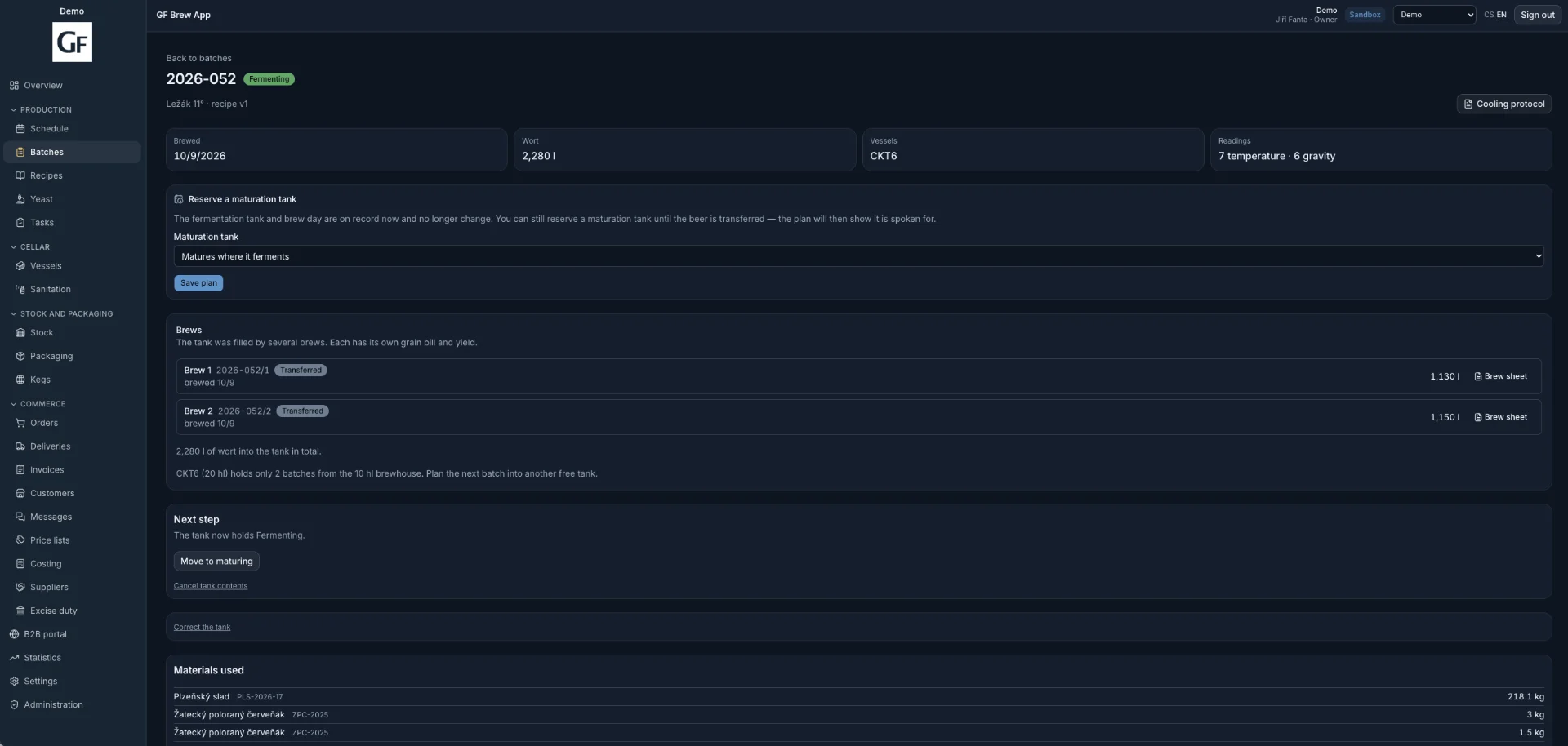
- Several brews into one tank (2026-014/1, /2); the app checks how many fit
- Entries work without signal too
- An expired lot or a weight above stock is saved with a warning
Schedule
A calendar of batches and vessel occupancy over eight weeks: last week, this week and six ahead. A batch is moved by dragging it.
Find a slot answers "When is the earliest I can brew?". It searches half a year ahead, including maturation in the same tank or a lager tank, and creates the batch straight from the result.
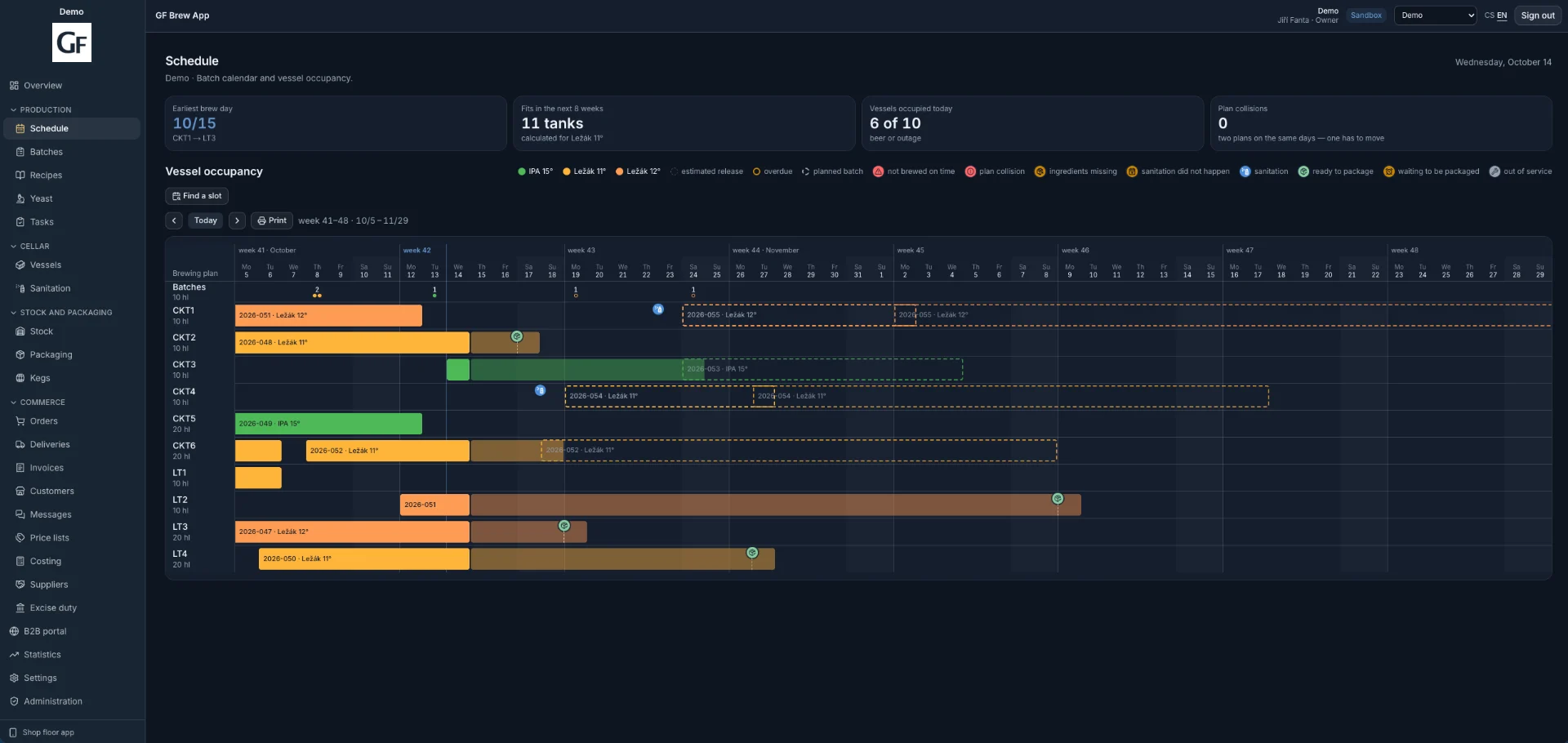
- Conflicts in the plan are flagged, not forbidden
- Colour marks: not brewed on time, ingredients missing, cleaning did not happen
- Cleaning is scheduled for every vessel filling
- A4 print of the plan
Batches
A list of all batches with their state: planned, wort, fermenting, maturing, closed. Search by tank number, batch number or beer name.
The batch detail shows what was brewed into the tank and how much, from which ingredient lots, the brew sheet for every brew and the next step: transfer to maturation, or reserving a maturation tank so the plan counts it as taken.
Older batches from paper records can be entered afterwards, so the statistics have a history.
Tasks
The head brewer sets extra work with a due date, optionally for a vessel or a piece of equipment. Operators see it on the Today screen of the phone together with what follows from the plan: what is being brewed, what to read, what to clean and which tank to transfer.
Coming days shows tomorrow and the day after, on Fridays through to Monday, with a list of what to prepare for brewing.
- An overdue task stays visible until it is done
- Operators report a fault on a tank from the phone and the head brewer gets a task
Demo and contact
See what it looks like
Get 14 days of access to a sample brewery with real data. If you like it, we set up a 60-day trial with your own brewery so you can try the app on your own data.
14-day demo · your own brewery on a 60-day trial · monthly, no commitment